IT Documentation for Small Business: A 2026 Guide


IT documentation is defined as the structured record of all technology systems, processes, and configurations that keep a business running. The role of IT documentation in small business operations goes far beyond filing passwords in a spreadsheet. Small businesses with active IT documentation experience 40% fewer unplanned incidents and resolve technical issues three times faster than those without it. That gap compounds fast when you are running lean. Documentation is the institutional memory your business needs to scale, survive staff turnover, and respond to security threats without losing days of productivity.
How does IT documentation improve operational efficiency?
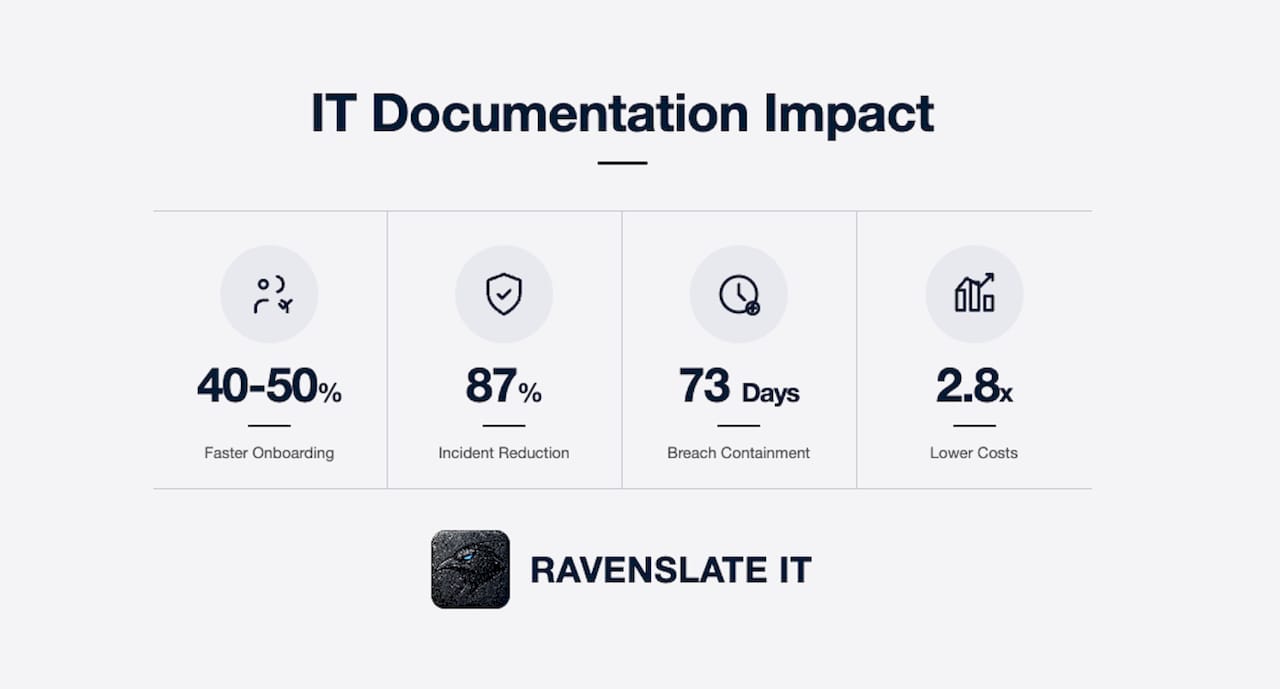
Documented IT systems cut onboarding time by up to 40–50% compared to undocumented environments. That means a new hire or a new IT provider can get up to speed without spending days tracking down who knows what. Every hour saved in onboarding is an hour your team spends on actual work.
The impact on incident resolution is even sharper. Implementing IT documentation platforms produces an 87% reduction in mean-time-to-resolution for service tickets. That statistic reflects a simple truth: when your technician already knows the network layout, the software versions, and the last change made to a system, they fix the problem instead of diagnosing the environment first.
Documentation also standardizes how devices and software get configured. Without a written standard, every technician makes slightly different decisions. Those small differences accumulate into inconsistencies that cause support tickets, security gaps, and failed updates. A written configuration baseline eliminates that drift.
| Scenario | With documentation | Without documentation |
|---|---|---|
| New employee onboarding | 40–50% faster | Dependent on tribal knowledge |
| Service ticket resolution | 87% faster (MTTR) | Diagnosis-first, resolution-second |
| System scaling errors | Baseline configuration applied | 40% more configuration errors |
| IT provider transition | Credentials and configs ready | Days of discovery work |
Pro Tip: Add a documentation update step to every change management workflow. When a technician modifies a system, the last step is updating the relevant record. This keeps documentation current without requiring a separate project.
What role does IT documentation play in cybersecurity?
Organizations with documented security configurations contain cyber breaches in 73 days on average versus 241 days without documentation. That is a 3.3x difference in exposure time. For a small business, 241 days of an active breach is often a business-ending event.

Documentation reveals security gaps that are invisible without it. Active accounts belonging to former employees, inconsistent permission settings across systems, and undocumented firewall rules are all common findings when a business finally maps its environment. Poor IT documentation creates operational blind spots that delay incident recovery and raise costs directly. Missing passwords and unclear network diagrams are not minor inconveniences. They are the reason a two-hour recovery becomes a two-day crisis.
Documentation also supports compliance readiness. Cyber insurers increasingly require evidence of documented security controls before issuing or renewing policies. A business that cannot produce a written record of its access management practices or patch schedules faces claim denials and higher premiums.
Every small business should maintain these security documents at minimum:
- A network diagram showing all devices, connections, and firewall rules
- A user access register with current permissions and last-reviewed dates
- A patch management log showing update history for all systems
- An incident response plan with contact lists and escalation steps
- A vendor and credential register for all third-party services
Pro Tip: Schedule a quarterly review of your security documentation. Set a calendar reminder and assign one person as the owner. Stale documentation is almost as dangerous as no documentation, because it creates false confidence.
Why is IT documentation essential for business continuity?
Dependency on undocumented individual knowledge is the greatest risk to business continuity. When the person who built your network leaves, and that knowledge exists only in their head, your business loses its ability to manage, troubleshoot, or hand off that infrastructure. This is not a rare scenario. It happens to small businesses constantly, and the cost is severe.
Businesses lacking IT documentation incur 2.8 times higher onboarding costs and 40% more configuration errors during system scaling. Those numbers reflect what happens when a new IT provider or employee has to reverse-engineer an environment instead of working from a clear record. Every hour of discovery work is billable time that documentation would have eliminated.
Documentation also prevents vendor lock-in. When your configurations, credentials, and system logic are captured in writing, switching IT providers becomes a structured handoff instead of a hostage negotiation. Without documentation, the outgoing provider holds all the knowledge, and the transition drags on for weeks.
Follow these steps to transfer knowledge from people to documentation:
- Identify the three people in your business who hold the most IT knowledge.
- Interview each one and record every system, process, and credential they manage.
- Assign a documentation owner for each system or process area.
- Build a shared documentation repository that is accessible to your IT provider and key staff.
- Set a review cycle, quarterly at minimum, to keep records current.
Pro Tip: Treat documentation as a mandatory deliverable during every IT project, not a post-project chore. If a new system goes live without written records, the knowledge gap starts on day one.
What are the best practices for IT documentation in a small business?
Start with your highest-impact systems, not everything at once. Documenting your entire environment in one effort is unrealistic for a small team. Prioritize the systems that, if they failed or changed hands, would cause the most disruption. Your core network, your primary business application, and your backup system are the right starting points.
IT documentation is most effective when treated as a living, continuously updated asset rather than a one-time project. The Diátaxis framework, a widely used documentation structure developed by Daniele Procida, organizes content into four types: tutorials, how-to guides, technical references, and explanations. Each type serves a different purpose. Tutorials teach. How-to guides solve specific problems. Technical references describe systems. Explanations provide context. Using all four types gives your documentation real utility instead of just coverage.
Assign ownership for every document. A document with no owner goes stale. Ownership means one person is responsible for keeping that record accurate and reviewing it on schedule. Pair ownership with a defined review cycle, quarterly for security documents, annually for stable infrastructure records.
| Documentation format | Best use case | Review frequency |
|---|---|---|
| Network diagram | Infrastructure overview and troubleshooting | Quarterly |
| How-to guide | Repeatable tasks like onboarding or backups | After each process change |
| Technical reference | System specs, software versions, configurations | After each system change |
| Incident response plan | Security events and recovery procedures | Annually or after an incident |
| Vendor register | Third-party contacts, contracts, credentials | Quarterly |
Budget for documentation from the start. Documentation and training require 20–30% of total project costs to be done properly. Businesses that skip this allocation treat documentation as optional and then pay for that decision later in recovery costs, onboarding delays, and compliance failures.
The tools you use matter less than the habit you build. A well-maintained wiki in a platform like Confluence, Notion, or IT Glue outperforms a neglected enterprise system every time. Choose a tool your team will actually use, and keep it simple enough that updates take minutes, not hours.
Pro Tip: Create a single-page “system passport” for every major application or piece of infrastructure. Include the owner, the vendor contact, the login method, the last update date, and the backup location. One page per system is enough to save hours in a crisis.
Key takeaways
Effective IT documentation is the single most reliable way for a small business to reduce incidents, accelerate recovery, and protect institutional knowledge from walking out the door.
| Point | Details |
|---|---|
| Documentation cuts incidents | Small businesses with active documentation experience 40% fewer unplanned incidents. |
| Breach containment is faster | Documented security configurations reduce breach containment time from 241 days to 73 days. |
| Knowledge retention protects continuity | Undocumented knowledge in one person’s head is the top business continuity risk. |
| Budget for it from day one | Allocate 20–30% of project costs to documentation and training to avoid costly gaps later. |
| Treat it as a living asset | Documentation updated continuously during projects stays accurate and actually gets used. |
What I’ve learned from watching small businesses fly blind
Most small business owners I talk to know their IT is undocumented. They just do not think it matters yet. That “yet” is the problem. Documentation does not become valuable the moment you create it. It becomes valuable the moment something goes wrong, and by then it is too late to build it.
The businesses I see struggle the most are not the ones with old equipment or tight budgets. They are the ones where one person knows everything. That person might be a longtime employee, a part-time IT contractor, or the owner themselves. When that person is unavailable, the business stops. Not slows. Stops.
The other pattern I see constantly is treating documentation as paperwork. It is not. A network diagram is not bureaucracy. It is the difference between a two-hour fix and a two-day outage. An access register is not compliance theater. It is how you catch the former employee account that is still active six months after they left.
The businesses that get this right embed documentation into their project plans from day one. They do not document after the fact. They document as they build, and they assign someone to own each record. That discipline pays off every single time there is a staff change, a security incident, or a vendor transition.
If you are waiting until your IT feels “complex enough” to document, you are already behind. Start with your three most critical systems this week. One page each. That is enough to begin.
— Christian G Grieco, Founder & Executive President of Technology of RavenSlate IT
RavenSlate IT builds the documentation your business is missing
Small businesses in the Capital Region work with RavenSlate IT to get a clear, written picture of their IT environment for the first time. Every engagement starts with a fixed-fee Stability and Risk Audit that identifies every gap, every undocumented system, and every security exposure, then delivers a written report and a clear action plan.
RavenSlate IT’s Managed Stability Retainer keeps your documentation current as your business grows, so you are never caught without the records you need. If your IT lives in someone’s head instead of a shared system, that is the risk RavenSlate IT is built to fix. Visit ravenslateit.com to see how structured, documented IT support works in practice.
FAQ
What is IT documentation for a small business?
IT documentation is the written record of all technology systems, configurations, processes, and credentials a business relies on. It serves as the institutional memory that keeps operations running when staff changes or systems fail.
How does IT documentation reduce cybersecurity risk?
Documented security configurations help contain breaches in 73 days on average versus 241 days without documentation. Documentation also surfaces active old accounts and inconsistent permissions that create security exposure.
How often should small businesses update their IT documentation?
Security documents should be reviewed quarterly. Stable infrastructure records need annual review at minimum, and any document tied to a system or process should be updated immediately after a change occurs.
What happens when a small business has no IT documentation?
Businesses without documentation incur 2.8 times higher onboarding costs, experience 40% more configuration errors during scaling, and face significantly longer recovery times after security incidents or staff departures.
Where should a small business start with IT documentation?
Start with your three highest-impact systems: your core network, your primary business application, and your backup process. Create one written record for each, assign an owner, and set a review date before moving on to less critical systems.