How to Upgrade your Business IT Infrastructure


An IT infrastructure upgrade is a deliberate process of replacing or improving hardware, software, and network systems to reset risk and align technology with your business goals. For small business owners who want to upgrade their business IT infrastructure, the payoff is concrete: fewer outages, tighter security, and systems that actually support growth instead of holding it back. The industry term for this process is IT infrastructure modernization, and it goes well beyond swapping old computers for new ones. Done right, it is a phased, planned effort that touches everything from your servers and network to your cloud services and security policies.
How to assess your current IT infrastructure effectively
A thorough assessment is the foundation of any successful business infrastructure upgrade. You cannot fix what you have not mapped, and most small businesses in capital region NYS and beyond are surprised by what they find when they look closely.
Start with a full inventory of every component in your environment:
- Hardware: Servers, workstations, laptops, switches, routers, and any on-site storage devices
- Software: Operating systems, business applications, licenses, and version numbers
- Network: Bandwidth capacity, Wi-Fi coverage, firewall rules, and VPN configurations
- Security posture: Patch levels, user access controls, backup status, and endpoint protection
Once you have the inventory, benchmark performance against your actual business needs. A server running at near-full capacity every afternoon is a risk, not just a nuisance. Upgrading memory and storage on that server can relieve pressure without unnecessary complexity, buying time while you plan a larger refresh.
Security is the non-negotiable part of this step. Legacy systems expose businesses to cyberattacks and reliability failures that are far more expensive to recover from than to prevent. Check every system for unpatched software, default passwords, and outdated communication tools.

Pro Tip: Build a simple spreadsheet with four columns: asset name, age, last update date, and business criticality. Sort by criticality first, then age. That single document becomes your upgrade priority list.
Finally, align your findings with your growth plans. If you plan to add five employees or open a second location in the next 18 months, your current infrastructure needs to support that future state, not just today’s headcount.
How do you build an IT upgrade roadmap that fits your budget?
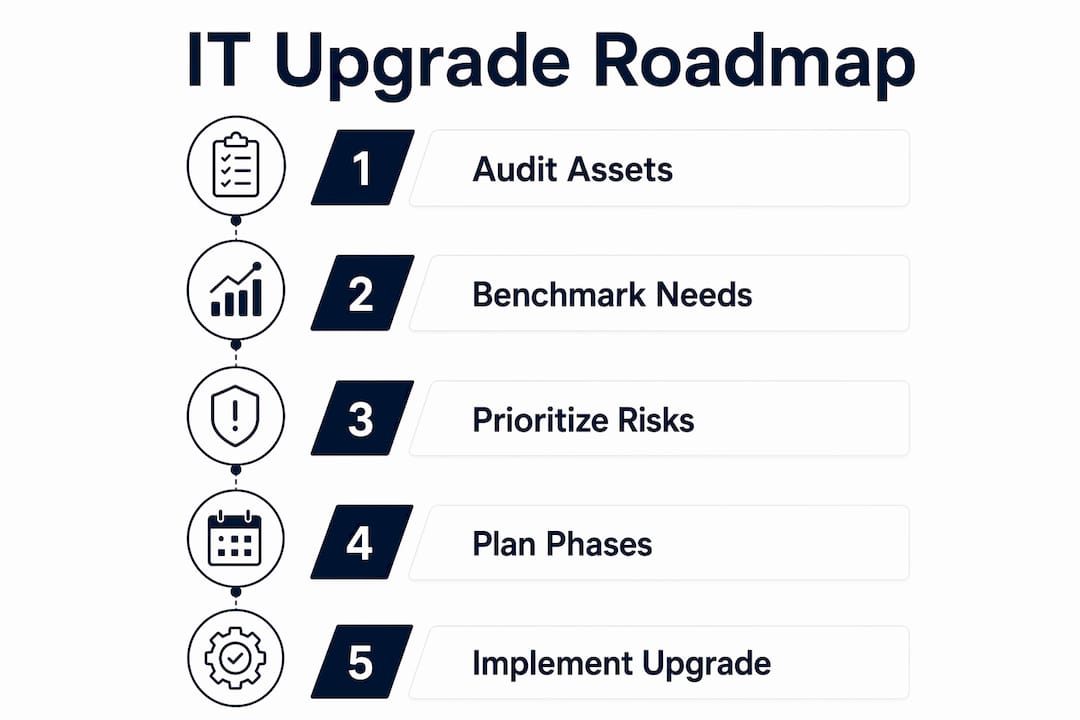
Planning is where most small business IT projects either succeed or collapse. IT infrastructure fails more often due to lack of ownership and strategy than because of poor tools. That means your roadmap needs a clear owner, a defined scope, and priorities tied to business value.
Follow this sequence when building your plan:
- Rank by risk and impact. Fix security gaps and stability risks first. A firewall running end-of-life firmware is a higher priority than upgrading a workstation that works fine.
- Phase your upgrades. Spread work across 90-day windows. Phased upgrades often show improvements within 60–90 days through quick wins like security hardening and cloud cost reduction.
- Set a realistic budget. Factor in hardware, software licenses, migration labor, and staff training. Skipping training is one of the most common budget mistakes.
- Include cloud migration in the plan. Cloud migration reduces dependence on physical hardware while improving access for remote or hybrid teams.
- Build in a contingency. Reserve 15–20% of your budget for surprises. Older environments almost always hide problems that only surface during the upgrade process.
The phased approach beats a full replacement for most small businesses in the capital region of NYS and beyond. A full replacement is disruptive, expensive, and hard to reverse if something goes wrong. Phased upgrades let you validate each change before committing to the next one.
Reactive fixes cost significantly more than proactive lifecycle management. Waiting until a server fails to replace it means paying emergency rates, losing data, and losing revenue during downtime. Lifecycle management spreads those costs over time and keeps disruption predictable.
What should you look for when choosing IT solutions from the capital region?
Choosing the right technology and the right support partner is where many small businesses get burned. The criteria that matter most are security compatibility, growth capacity, and the quality of ongoing support.
On-premises vs. cloud: what actually fits your business
On-premises infrastructure gives you direct control over your data and can perform better for latency-sensitive applications. Cloud infrastructure reduces your hardware footprint, lowers upfront costs, and makes it easier to scale. Most small businesses land on a hybrid model: cloud for productivity tools and backups, on-premises for any systems that require local performance or regulatory control.
Why local support matters more than you think
A provider who can physically show up at your office in Saratoga is worth more than a remote-only vendor when something breaks at 8 a.m. on a Monday. Managed service providers fill expertise gaps in cloud, security, and automation that are simply unrealistic for small businesses to hire in-house. Look for a provider who delivers structured, documented work rather than open-ended break/fix contracts with no accountability.
Pro Tip: Ask any IT provider for a sample deliverable before you sign. A real provider gives you a written report and a defined action plan. A vendor who cannot show you what a finished engagement looks like is not ready to own your infrastructure.
Avoid providers who lock you into multi-year contracts before completing an audit. You should know exactly what you are paying for and why before any work begins.
What are the best practices for implementing an IT upgrade?
Execution is where plans meet reality. The businesses that get through upgrades with minimal disruption follow a consistent set of practices.
- Run legacy and new systems in parallel. Parallel runs validate that new systems handle real workloads before you cut over completely. This gives you a rollback option if something fails.
- Test before you go live. Run your critical applications on the new environment for at least a week before decommissioning the old one. Document every test result.
- Train your staff before the cutover date. Process changes like automating data workflows require preparing teams alongside the technology. Skipping this step creates friction that slows adoption for months.
- Verify your backups before touching anything. Confirm that your backup system is working and that you can actually restore from it. Many businesses discover their backups are broken only when they need them.
- Assign a single owner for the project. Every decision, every vendor call, and every timeline change goes through one person. Diffused ownership is the fastest way to let an upgrade stall.
“Upgrades should be a business decision focused on resetting risk and aligning technology with growth strategy, not just technical refreshes.” — 3rd Element Consulting
The most common mistake small businesses make is treating an upgrade as a one-time event. Technology has a lifecycle. Plan for the next refresh before you finish the current one, and you will never be caught reacting to a failure again.
Key Takeaways
Upgrading your small business IT infrastructure requires a phased, documented plan with clear ownership, security as the first priority, and lifecycle management built in from the start.
| Point | Details |
|---|---|
| Start with a full audit | Inventory every asset and rank it by business criticality before spending a dollar on upgrades. |
| Phase your upgrades | Work in 90-day windows to validate changes and reduce disruption to daily operations. |
| Prioritize security first | Fix unpatched systems and access control gaps before upgrading performance or capacity. |
| Assign a single project owner | Projects without a clear owner stall. One person must own every decision and timeline. |
| Plan for the next lifecycle | Build your next refresh into the plan before the current upgrade is complete. |
What I have learned from watching small businesses upgrade their IT
Most small business owners I talk to think of an IT upgrade as a cost. They are wrong. The businesses that treat it as a risk management decision come out ahead every time.
The pattern I see repeatedly in the Capital Region is this: a business runs aging infrastructure until something breaks, then spends three times the budget fixing it under pressure. The downtime alone costs more than a proactive upgrade would have. The stress is worse than the invoice.
What actually works is boring and unglamorous. You audit what you have. You rank the risks. You fix the highest-risk items first, even if they are not the most visible. You document everything. Then you do it again in 18 months.
The hybrid cloud model gets oversold as a silver bullet, but for most small businesses, it is simply the right fit. Keep your sensitive data on-premises if your industry requires it. Move your productivity tools and backups to the cloud. Stop paying for hardware you do not need.
The other thing I will say plainly: the provider relationship matters as much as the technology. A local IT partner who shows up, writes things down, and tells you what they found is worth more than a national vendor with a slick portal and a 48-hour response time. You need someone who knows your building, your team, and your business goals.
— Christian Grieco, Founder & Executive President of Technology of RavenSlate IT
RavenSlate IT works with small businesses on exactly this
Small businesses do not need a bloated IT contract. They need a clear picture of where they stand and a defined plan to fix it.
RavenSlate IT starts every engagement with a fixed-fee Stability and Risk Audit. You get a written report, a prioritized action plan, and no surprise invoices. From there, the Build and Harden service fixes what the audit finds, with a defined scope and documented delivery. For ongoing support, the Managed Stability Retainer provides structured IT oversight without the chaos of traditional break/fix arrangements. If you are ready to see exactly where your infrastructure stands, start with an audit and get the clarity your business needs to move forward.
FAQ
What does an IT infrastructure upgrade actually include?
An IT infrastructure upgrade covers hardware, software, network systems, security configurations, and cloud services. The goal is to align every component with your current and future business needs, not just replace old equipment.
How long does a typical small business IT upgrade take?
A phased upgrade for a small business typically runs in 90-day windows per phase. The full process from audit to completion depends on the size of the environment and the number of gaps identified.
How do I know if my small business needs an IT upgrade now?
Legacy systems that cause reliability issues or expose you to security risks are the clearest signal. If your systems are slow, unpatched, or unsupported by the vendor, the upgrade is overdue.
What is the difference between an IT upgrade and IT modernization?
An IT upgrade typically refers to improving specific components like memory or storage. IT modernization is the broader process of redesigning your infrastructure to fix inefficiencies, improve security, and support growth across all systems.
Should I use a managed service provider for my IT upgrade?
For most small businesses, yes. MSPs provide strategic IT leadership in cloud, security, and automation that is not realistic to hire in-house. Choose one that delivers documented, structured work rather than open-ended support contracts.